Jash Naik
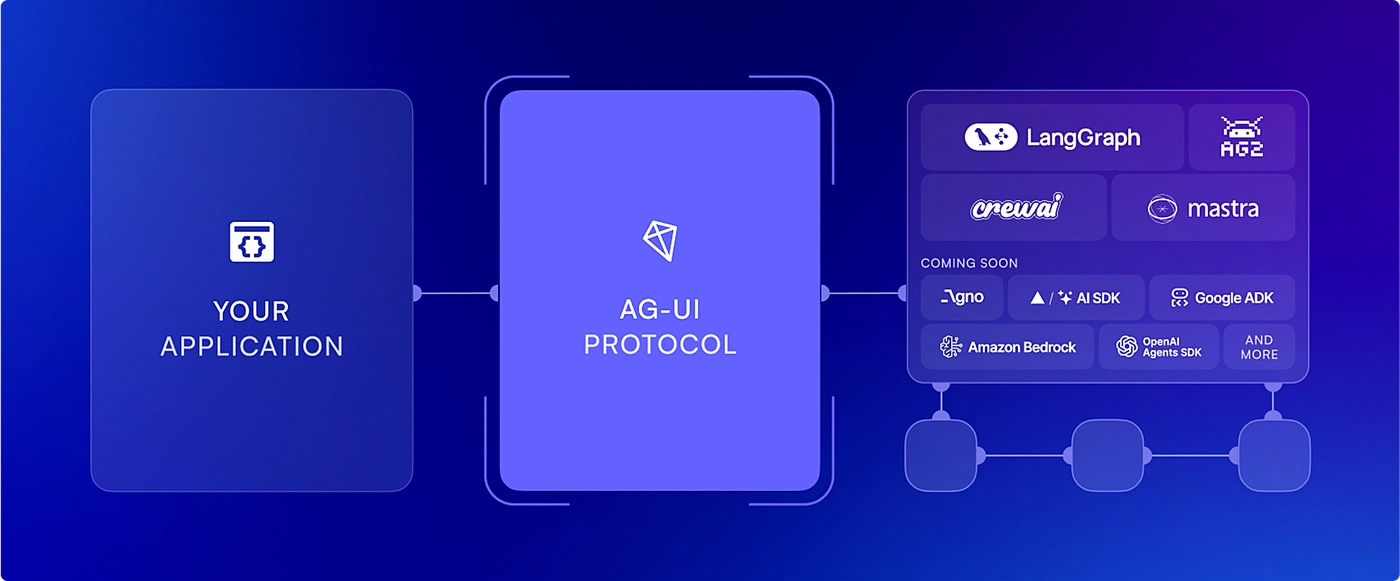
AG-UI Protocol: The Missing Piece in AI Application Development
- Standardizes how AI agents communicate with user interfaces
- Handles complex state management and real-time updates automatically
- Enables human-in-the-loop workflows with seamless interruption and resumption
- Supports multi-agent systems with secure, scoped interactions
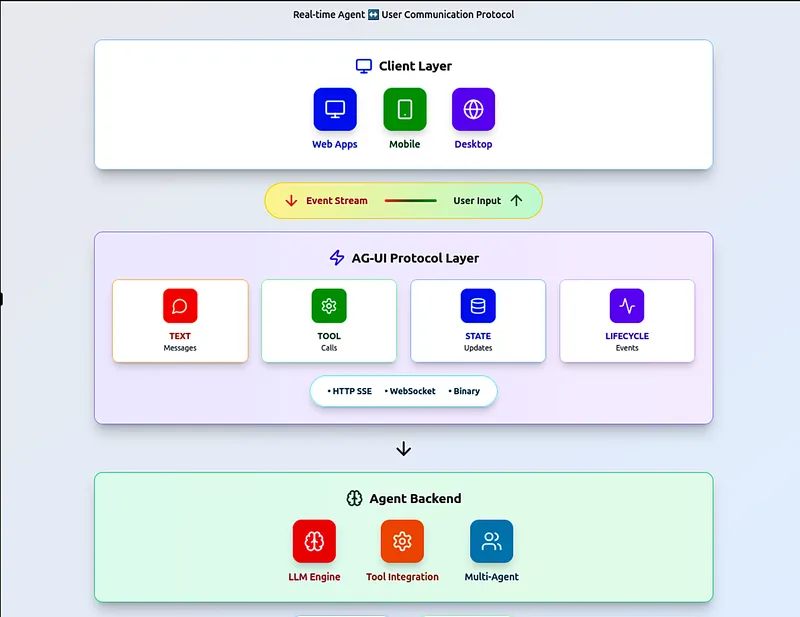
High-level architecture overview of AG-UI protocol and its components
The Problem Every AI Developer Faces
Picture this: You’ve built a chatbot that works great in demos. Users love the conversational flow, the AI responds intelligently, and everything seems perfect. Then you try to add a simple feature—letting users interrupt the AI mid-conversation to ask a follow-up question.
Suddenly, your “simple” chatbot becomes a nightmare of state management, WebSocket connections, and race conditions. The AI loses context, the UI gets out of sync, and users are frustrated.
This is the reality of building AI applications that go beyond basic chat interfaces. Traditional web applications follow a simple pattern: user clicks button → server processes request → response sent back. But AI applications are fundamentally different:
- They’re conversational: Users expect ongoing, multi-turn conversations that can last minutes or hours
- They’re stateful: The AI needs to remember what happened earlier, what tools it used, and user preferences
- They’re interactive: Users want to interrupt, redirect, or modify what the AI is doing in real-time
- They’re unpredictable: Unlike traditional apps with fixed workflows, AI applications need to handle the AI making decisions that affect the user interface dynamically
Let’s say you’re building a document analysis tool. The AI needs to read and process large documents, call external APIs, show progress updates, allow user interruptions, remember conversation context, and update the UI based on findings. Without a proper framework, you end up building custom solutions for each challenge, creating a mess of WebSocket handlers, state synchronization logic, and UI update mechanisms that are hard to debug and maintain.
// What you end up building without AG-UI
class CustomAIIntegration {
  private websocket: WebSocket;
  private state: Map<string, any> = new Map();

  async handleUserMessage(message: string) {
    // ❌ Manual state management
    this.state.set('currentMessage', message);

    // ❌ Custom WebSocket handling
    this.websocket.send(JSON.stringify({
      type: 'user_message',
      data: message,
      sessionId: this.getSessionId()
    }));

    // ❌ Manual UI updates
    this.updateUI('thinking', 'AI is processing...');

    // ❌ Custom event handling - 200+ lines of complex logic
    this.websocket.onmessage = (event) => {
      const data = JSON.parse(event.data);
      // Handle state, UI updates, tool calls, interruptions...
    };
  }

  // ❌ No built-in support for interruptions, tool calls, or state persistence
}
AG-UI (Agent-User Interaction Protocol) is an open standard that solves these problems by providing a complete framework for building AI applications. Think of it as the missing layer between your AI agent and your user interface.
Instead of building custom WebSocket handlers and state management from scratch, AG-UI gives you standardized communication between AI agents and UIs, built-in state management that handles complex scenarios automatically, human-in-the-loop workflows with seamless interruption and resumption, and multi-agent coordination for sophisticated AI systems.
With AG-UI, that document analysis tool we mentioned becomes straightforward:
// With AG-UI, complex AI applications become simple
import { AGUIClient } from '@ag-ui/client';

class DocumentAnalysisApp {
  private agui: AGUIClient;

  async analyzeDocument(document: Document) {
    // ✅ Create session with built-in state management
    const session = await this.agui.createSession({
      threadId: `analysis-${document.id}`,
      capabilities: ['streaming', 'tools', 'interrupts']
    });

    // ✅ Handle interruptions automatically
    session.on('interrupt', async (event) => {
      const userInput = await this.promptUser(event.context);
      await session.resumeWithUserInput(userInput);
    });

    // ✅ Execute analysis with built-in tool support
    return await session.runAgent({
      task: 'analyze_document',
      document: document,
      tools: ['file_reader', 'web_search', 'data_analyzer']
    });
  }
}
The key insight is that AG-UI handles all the complex plumbing—state synchronization, event handling, tool coordination, and UI updates—so you can focus on building the actual AI logic.
Why AG-UI Changes Everything
Let’s look at the actual problems developers face and how AG-UI solves them with concrete advantages:
Traditional Approach Problems:
- Manual WebSocket management with custom event handling
- Lost state when users refresh or switch tabs
- No interruption handling - users can’t stop or redirect AI mid-task
- Security nightmares - agents have unrestricted access to everything
- Impossible debugging when multiple agents conflict
- Custom UI updates for every tool call and state change
AG-UI Solutions:
- Automatic state synchronization across tabs and network issues
- Seamless human interruptions with full context preservation
- Secure agent permissions with scoped access controls
- Built-in conflict resolution when multiple agents modify the same data
- Real-time tool streaming with automatic UI rendering
- Event-sourced state for perfect debugging and replay
Key AG-UI Advantages
State Management: Event-sourced state with automatic persistence and conflict resolution. Never lose user context again.
Human Interruptions: Built-in interruption system with full state preservation. Stop, edit, and resume seamlessly.
Multi-Agent Coordination: Secure sub-agent composition with permission scoping. Complex AI systems made simple.
Real-Time Tools: Streaming tool outputs with automatic UI rendering. Users see what’s happening.
Event-Driven Architecture: 16 standardized event types for seamless agent-frontend communication.
Transport Agnostic: Works with SSE, WebSockets, webhooks, and more - choose what fits your architecture.
Framework Integrations: Ready-to-use connectors for LangGraph, CrewAI, Mastra, and other popular agent frameworks.
Design Principles: Built on open standards, transport-agnostic, and framework-agnostic for maximum flexibility and adoption.

Detailed view of AG-UI’s event-driven communication flow
Core Architecture & SDK
Protocol Layer: Standardized HTTP client with 16 event types for agent-frontend communication.
Message Types: Structured message format with thread_id, run_id, and event_type for reliable communication.
Running Agents: Built-in support for agent lifecycle management with start, pause, resume, and cancel operations.
Tools and Handoff: Seamless tool execution with real-time streaming and automatic UI rendering.
Events: Comprehensive event system covering state changes, tool calls, interruptions, and user interactions.
SDK Support:
- @ag-ui/core: TypeScript definitions and runtime schemas
- @ag-ui/sdk: Complete SDK for agent integration
- Framework Connectors: LangGraph, CrewAI, Mastra integrations
- Transport Options: SSE, WebSockets, webhooks, and custom transports
Real-World Impact
Before AG-UI: 3-6 months to build basic AI apps with constant debugging, security vulnerabilities, and poor user experience.
With AG-UI: 1-2 weeks to build sophisticated multi-agent AI applications with zero state management code, built-in security, and seamless user experience.
The Bottom Line
AG-UI isn’t just another protocol—it’s the missing foundation that makes production AI applications actually work. By handling the complex plumbing of state management, real-time communication, and multi-agent coordination, AG-UI lets you focus on building the AI logic that matters.
What You Get Out of the Box:
- Event-sourced state with automatic conflict resolution
- Human-in-the-loop workflows with seamless interruption and resumption
- Secure sub-agent composition with permission scoping
- Real-time tool streaming with automatic UI rendering
- Agent steering for dynamic behavior redirection
- Multimodal support for files, images, audio, and more
- 16 standardized event types for reliable agent-frontend communication
- Transport-agnostic architecture supporting SSE, WebSockets, and webhooks
- Framework connectors for LangGraph, CrewAI, Mastra, and more
- Complete SDK with TypeScript definitions and runtime schemas
What You Stop Worrying About:
- ❌ Manual WebSocket management
- ❌ State synchronization across tabs
- ❌ Security vulnerabilities from agent access
- ❌ Debugging complex agent interactions
- ❌ Building custom UI update mechanisms
- ❌ Handling network failures and reconnections
Ready to Build Production AI Applications?
AG-UI transforms the way you build AI applications. Instead of spending months on infrastructure, you can focus on the AI logic that actually matters. The protocol handles all the complex plumbing so you can build sophisticated, production-ready AI applications in days, not months.
Get Started Today:
- Documentation: AG-UI Protocol Guide
- SDK & Core: @ag-ui/core and @ag-ui/sdk
- GitHub: Open source implementation
- Framework Connectors: LangGraph, CrewAI, Mastra
- Community: Join developers building the future of AI applications
The future of AI applications is here. AG-UI makes it accessible to every developer.
You May Also Like
Building AI Applications with MCP: A Complete Guide Using LangChain and Gemini
Learn to build intelligent AI applications using Model Context Protocol (MCP) with LangChain, langchain-mcp-adapter, and Google Gemini models. From setup to deployment, create a fully functional CLI chat application.
Demystifying AWS Strands Agents: A Developer-Friendly Guide to Building AI Agents in Minutes
AWS Strands Agents is an open-source SDK that revolutionizes AI agent development by embracing a model-driven approach, allowing developers to build production-ready agents with just a few lines of code.
Determinism vs Intelligence: How to Build Reliable AI-Powered Security Products
Explore the fundamental conflict between deterministic execution and intelligent reasoning in AI-powered security products, and learn how to build reliable systems using Open Policy Agent (OPA) and model ablation.